阻擋暴力破解除了防火牆、OTP、MFA 外,還可以安裝 fail2ban 來阻止暴力破解
安裝方式
apt install fail2ban
fail2ban 會配合iptables 運作,所以如果沒安裝 iptables 的話請一併安裝
apt install iptables
編輯設定檔
cd /etc/fail2ban
cp jail.conf jail.local
服務啟動時,會先讀 jail.conf,再讀 jail.local,如果同樣一筆設定有衝突的話,後者會把前者設定複寫
所以自訂的設定請寫在 jail.local,其他的就讀 jail.conf 預設值
啟動 fail2ban
systemctl restart fail2ban
helloworld 發表在 痞客邦 留言(0) 人氣(3)
類似 apache 等 web server 的 rewrite rule 功能
command:
- "........"
- "........"
- "--entrypoints.web.address=:80"
- "--entrypoints.web.http.redirections.entryPoint.to=websecure" ## force redirect to https
- "--entrypoints.web.http.redirections.entryPoint.scheme=https"
- "--entrypoints.web.http.redirections.entrypoint.permanent=true"
- "--entrypoints.websecure.address=:443"
測試
root@lab:/home/lab# curl -I http://lab.pass.tw/testurl
HTTP/1.1 308 Permanent Redirect
Location: https://lab.pass.tw/testurl
Date: Mon, 19 Dec 2022 08:28:03 GMT
Content-Length: 18
Content-Type: text/plain; charset=utf-8
helloworld 發表在 痞客邦 留言(0) 人氣(15)
以前在 troubleshooting 或是 debug crontab 的時候,習慣會去看一下 /var/mail 下面的郵件
正常的輸出及錯誤訊息都會記錄在郵件裡面
但現在的Linux 預設都沒有安裝MTA
所以如果不想額外安裝或是沒有權限可以安裝的話
可以直接輸出在自訂的log 內
如
* * * * * /scripts/backup.sh >> /var/log/backup.log 2>&1
helloworld 發表在 痞客邦 留言(0) 人氣(2)
登入ssh, 檢查調整前硬碟狀況
root@example:~# lsblk
NAME MAJ:MIN RM SIZE RO TYPE MOUNTPOINT
sda 8:0 0 80G 0 disk
└─sda1 8:1 0 80G 0 part /
確定 filesystem 是否為 ext4
root@example:~# df -Th
Filesystem Type Size Used Avail Use% Mounted on
udev devtmpfs 1.8G 0 1.8G 0% /dev
tmpfs tmpfs 371M 76M 295M 21% /run
/dev/sda1 ext4 79G 71G 4.6G 94% /
tmpfs tmpfs 1.9G 0 1.9G 0% /dev/shm
tmpfs tmpfs 5.0M 0 5.0M 0% /run/lock
tmpfs tmpfs 1.9G 0 1.9G 0% /sys/fs/cgroup
登入 gcp console,選擇要加大空間的硬碟 > 編輯 > 直接指定想要的硬碟大小,只能加大,不能縮小
假設原來是80G,想增加至 100G,直接填100G 即可,最大可擴充到64T

在gcp 介面調整硬碟大小後,sda 已經變100G
root@example:~# lsblk
NAME MAJ:MIN RM SIZE RO TYPE MOUNTPOINT
sda 8:0 0 100G 0 disk
└─sda1 8:1 0 80G 0 part /
root@example:~# parted /dev/sda
GNU Parted 3.2
Using /dev/sda
Welcome to GNU Parted! Type 'help' to view a list of commands.
(parted) resizepart
Partition number? 1
Warning: Partition /dev/sda1 is being used. Are you sure you want to continue?
Yes/No? Yes
End? [85.9GB]? 100%
(parted) quit
Information: You may need to update /etc/fstab.
helloworld 發表在 痞客邦 留言(0) 人氣(7)
adminer 預設 port 為 8080,雖然不是正規的 80,433
但也很容易跟其他port 衝到
修改方法1,將container 的8080/tcp 對應到 host的 8088/tcp
ports:
- 8088/8080
修改方法2
直接修改 container 的 listen port
ports:
- 8088:8088
command:
- 'php'
- '-S'
- '[::]:8088'
- '-t'
- '/var/www/html'
進到 container 中檢查
# docker exec -it adminer_test sh
/var/www/html $ netstat -na
Active Internet connections (servers and established)
Proto Recv-Q Send-Q Local Address Foreign Address State
tcp 0 0 127.0.0.11:40403 0.0.0.0:* LISTEN
tcp 0 0 :::8081 :::* LISTEN
udp 0 0 127.0.0.11:43328 0.0.0.0:*
Active UNIX domain sockets (servers and established)
Proto RefCnt Flags Type State I-Node Path
helloworld 發表在 痞客邦 留言(0) 人氣(10)
# yum install -y yum-utils
# yum-config-manager --add-repo https://download.docker.com/linux/centos/docker-ce.repo
# yum install docker-ce docker-ce-cli containerd.io docker-compose-plugin
測試
# docker --version
Docker version 20.10.21, build baeda1f
安裝 docker-compose
# curl -L "https://github.com/docker/compose/releases/download/1.27.4/docker-compose-$(uname -s)-$(uname -m)" -o /usr/local/bin/docker-compose
# chmod +x /usr/local/bin/docker-compose
測試
# docker-compose --version
docker-compose version 1.27.4, build 40524192
helloworld 發表在 痞客邦 留言(0) 人氣(3)
vim 的 visual mode 對有些人可能比較方便
但我就是用不習慣XD
要怎麼關閉呢
vi ~/.viminfo (如果沒有的話,請自行建立)
新增一行 set mouse-=a
或是直接下指令新增
echo "set mouse-=a" >> ~/.vimrc
source ~/.vimrc
helloworld 發表在 痞客邦 留言(0) 人氣(14)
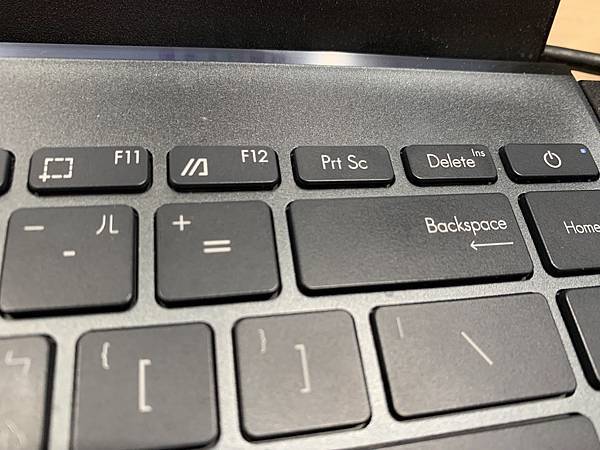
因為習慣的關係,常會用到insert key
但是剛拿到華碩的notebook 時,一時不知道該如何是好,insert 鍵到底在哪邊
原來是跟 del 同一個鍵,字超級小
要怎麼按 insert 鍵 : Fn + Shift + Delete
抱怨....好難用...設計華碩鍵盤的人在想什麼
helloworld 發表在 痞客邦 留言(0) 人氣(4,600)
搜尋image
# docker search httpd
下載 image
# docker pull httpd
列出host 的images
#docker images
# docker images httpd
在host 建立web的documentroot ,並放一個測試檔案
# mkdir /home/www
# echo "helloworld" > /home/www/index.html
啟動docker,並且把 CONTAINER 的80 port 對應到host 的8000 port
把host 的 /home/www/ mount 在 CONTAINER 的 /usr/local/apache2/htdocs/ 下
# docker run -itd --name labweb -p 8000:80 -v /home/www/:/usr/local/apache2/htdocs/ httpd
helloworld 發表在 痞客邦 留言(0) 人氣(23)
windows 內建的zip 解壓縮功能很方便也很直覺
如果沒有其他特殊需求,比如說要解 rar tar 7z 之類的檔案,其實真的可以不用再去下載其他的解壓縮工具
但壓縮成zip檔就沒那麼直覺了
以下是操作範例
1. 選取要壓縮的檔案或資料匣
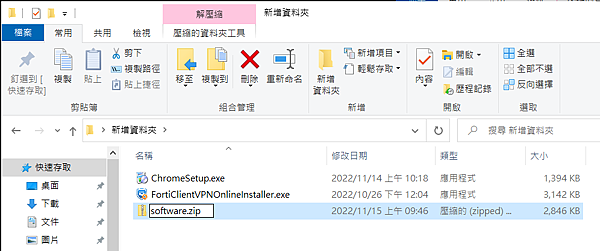
2. 點擊右鍵 > 傳送到 > 壓縮的 (zipped) 資料匣 > 可選擇要不要重新命名
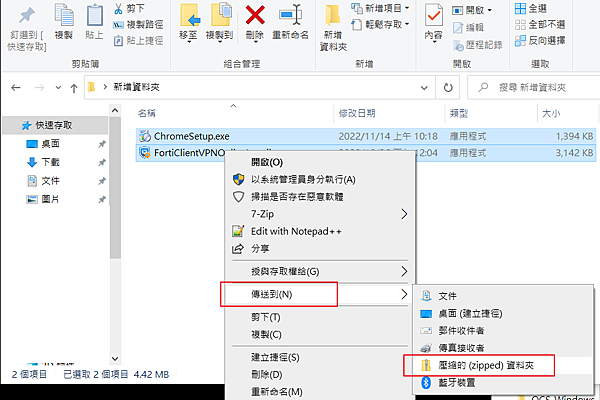
就完成了
helloworld 發表在 痞客邦 留言(0) 人氣(4)
