1. 建立 container
# docker create --name nginx_base -p 80:80 nginx:alpine
Unable to find image 'nginx:alpine' locally
alpine: Pulling from library/nginx
63b65145d645: Pull complete
8c7e1fd96380: Pull complete
86c5246c96db: Pull complete
b874033c43fb: Pull complete
dbe1551bd73f: Pull complete
0d4f6b3f3de6: Pull complete
2a41f256c40f: Pull complete
Digest: sha256:6318314189b40e73145a48060bff4783a116c34cc7241532d0d94198fb2c9629
Status: Downloaded newer image for nginx:alpine
3763eb9740e98479000e6daba1e62240ada2251915454f377227f6c4c74ebcd2
2. 檢查 images
# docker images
REPOSITORY TAG IMAGE ID CREATED SIZE
nginx alpine 2bc7edbc3cf2 5 weeks ago 40.7MB
3. 檢查 container
# docker ps -a
CONTAINER ID IMAGE COMMAND CREATED STATUS PORTS NAMES
3763eb9740e9 nginx:alpine "/docker-entrypoint.…" About a minute ago Created nginx_base
4. 啟動 container
# docker start nginx_base
nginx_base
helloworld 發表在 痞客邦 留言(0) 人氣(25)
$ sudo apt-get update
Get:1 http://dl.google.com/linux/chrome/deb stable InRelease [1811 B]
Err:1 http://dl.google.com/linux/chrome/deb stable InRelease
The following signatures couldn't be verified because the public key is not available: NO_PUBKEY 4EB27DB2A3B88B8B
Get:2 http://security.ubuntu.com/ubuntu focal-security InRelease [114 kB]
Get:3 http://mirrors.ubuntu.com/mirrors.txt Mirrorlist [425 B]
Hit:4 http://ftp.tku.edu.tw/ubuntu focal InRelease
Get:6 http://ftp.tku.edu.tw/ubuntu focal-backports InRelease [108 kB]
Get:5 http://ubuntu.cs.nctu.edu.tw/ubuntu focal-updates InRelease [114 kB]
Get:7 http://mirror01.idc.hinet.net/ubuntu focal-updates/universe amd64 Packages [1314 kB]
Ign:10 http://mirror.nwlab.tk/ubuntu focal-updates/multiverse amd64 Packages
Get:10 http://ftp.tku.edu.tw/ubuntu focal-updates/multiverse amd64 Packages [31.2 kB]
Ign:8 http://mirror01.idc.hinet.net/ubuntu focal-updates/main amd64 Packages
Get:9 http://mirror01.idc.hinet.net/ubuntu focal-updates/restricted amd64 Packages [2141 kB]
Ign:8 https://mirror.ossplanet.net/ubuntu focal-updates/main amd64 Packages
Ign:8 http://mirror.nwlab.tk/ubuntu focal-updates/main amd64 Packages
Ign:8 http://ftp.tku.edu.tw/ubuntu focal-updates/main amd64 Packages
Ign:8 http://ftp.ubuntu-tw.net/ubuntu focal-updates/main amd64 Packages
Ign:8 https://tw1.mirror.blendbyte.net/ubuntu focal-updates/main amd64 Packages
Ign:8 https://ubuntu.ccns.ncku.edu.tw/ubuntu focal-updates/main amd64 Packages
Get:8 http://archive.ubuntu.com/ubuntu focal-updates/main amd64 Packages [3026 kB]
Reading package lists... Done
W: GPG error: http://dl.google.com/linux/chrome/deb stable InRelease: The following signatures couldn't be verified because the public key is not available: NO_PUBKEY 4EB27DB2A3B88B8B
E: The repository 'http://dl.google.com/linux/chrome/deb stable InRelease' is not signed.
N: Updating from such a repository can't be done securely, and is therefore disabled by default.
N: See apt-secure(8) manpage for repository creation and user configuration details.
解決方式
$ sudo apt-key adv --keyserver keyserver.ubuntu.com --recv-keys 4EB27DB2A3B88B8B
Executing: /tmp/apt-key-gpghome.bXgfotSCrB/gpg.1.sh --keyserver keyserver.ubuntu.com --recv-keys 4EB27DB2A3B88B8B
gpg: key 7721F63BD38B4796: "Google Inc. (Linux Packages Signing Authority) <linux-packages-keymaster@google.com>" 2 new signatures
gpg: key 7721F63BD38B4796: "Google Inc. (Linux Packages Signing Authority) <linux-packages-keymaster@google.com>" 2 new subkeys
gpg: Total number processed: 1
gpg: new subkeys: 2
gpg: new signatures: 2
helloworld 發表在 痞客邦 留言(0) 人氣(437)
指令
rsync --list-only -e ssh backup@rsync-server::web/
錯誤訊息
rsync error: syntax or usage error (code 1) at clientserver.c(1296) [Receiver=3.2.7]
rsync: did not see server greeting
rsync error: error starting client-server protocol (code 5) at main.c(1814) [Receiver=3.2.3]
極可能是 rsync 的bug , 因為ssh 到遠端的 rsync server 時會找 ~/rsyncd.conf
而非 /etc/rsyncd.conf 或是 /usr/local/etc/rsync/rsyncd.conf
解決方式,把 rsyncd.conf link 到 homedir,或是直接把檔案 cp 到家目錄
ln -s /etc/rsyncd.conf ~backup/rsyncd.conf
再試一次,成功
helloworld 發表在 痞客邦 留言(0) 人氣(4)
首先建立 recive 端到來源端的 passwordless ssh 登入
rsync server
建立 backup 使用者
目的端
ssh-keygen -t RSA
ssh-copy-id backup@rsync-server
測試是否可以免密碼登入
ssh backup@rsync-server hostname
測試列出module 的檔案結構
rsync --list-only -e ssh backup@rsync-server::bakdir/
helloworld 發表在 痞客邦 留言(0) 人氣(1)
顯示網路卡
# dladm
啟用網卡
ipadm create-if e1000g0
設定ip
(1) dhcp
ipadm create-addr -T dhcp e1000g0/v4
(2) 固定ip
ipadm create-addr -T static -a local=192.168.100.96/24 e1000g0/v4
移除ip address設定
ipadm delete-addr e1000g0/v4
helloworld 發表在 痞客邦 留言(0) 人氣(51)
檔案結構如下
-rw-r--r-- 1 777 777 4 Jan 19 11:50 555.txt
lrwxrwxrwx 1 666 666 7 Feb 16 09:41 555.txt.lnk -> 555.txt
執行 chown 預設只會改變來源的 owner,也就是 555.txt
chown 888:888 555.txt.lnk
如果要變更 link 的 owner ,可以加以下參數
chown -h 888:888 555.txt.lnk
helloworld 發表在 痞客邦 留言(0) 人氣(19)
方法一:
到 https://www.cpan.org/ 搜尋要安裝的 module
以 IO::Socket::SSL 為例
https://metacpan.org/dist/IO-Socket-SSL/view/lib/IO/Socket/SSL.pod
左側欄位有下載連結,下載及安裝過程如下
# wget https://cpan.metacpan.org/authors/id/S/SU/SULLR/IO-Socket-SSL-2.079.tar.gz
# tar -zxpBvf IO-Socket-SSL-2.079.tar.gz
# cd IO-Socket-SSL-2.079
# perl Makefile.PL
# make
# make install
方法二:
# perl -MCPAN -e shell
cpan[1]> install IO::Socket::SSL
或是
cpan[1]> notest install IO::Socket::SSL
方法三:
# cpan IO::Socket::SSL
helloworld 發表在 痞客邦 留言(0) 人氣(15)
showmount: command not found
root@debian:~# apt-cache search showmount
nfs-common - NFS support files common to client and server
root@debian:~# apt install nfs-common
helloworld 發表在 痞客邦 留言(0) 人氣(13)
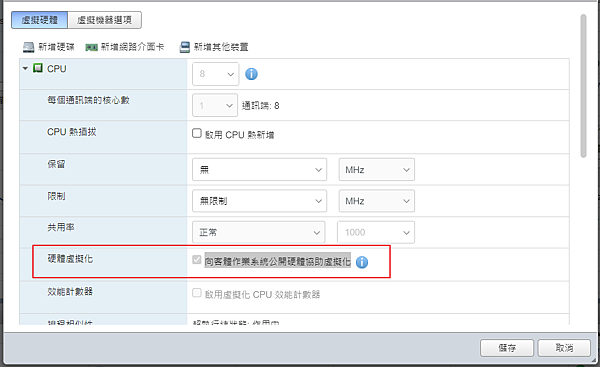
編輯設定 > 虛擬硬體 > CPU > 硬體虛擬化 > 勾選向客體作業系統公開硬體協助虛擬化
helloworld 發表在 痞客邦 留言(0) 人氣(6)
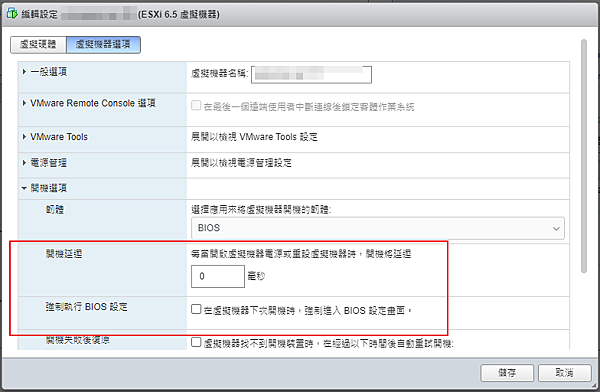
兩個方法
1. 編輯設定 > 虛擬機選項 > 開機延遲 > 填入秒數 > 在開機畫面時按 F2 進入 BIOS
2. 編輯設定 > 虛擬機選項 > 強制執行BIOS設定 > 勾選在虛擬機器下次開機時,強制進入 BIOS 設定畫面 (只會生效一次)
helloworld 發表在 痞客邦 留言(0) 人氣(54)
