- Jan 07 Sat 2023 17:10
-
安裝 fail2ban 阻擋暴力破解帳號密碼
- Dec 19 Mon 2022 16:26
-
透過 traefik 自動將 http 轉址到 https
類似 apache 等 web server 的 rewrite rule 功能
command:
- "........"
- "........"
- "--entrypoints.web.address=:80"
- "--entrypoints.web.http.redirections.entryPoint.to=websecure" ## force redirect to https
- "--entrypoints.web.http.redirections.entryPoint.scheme=https"
- "--entrypoints.web.http.redirections.entrypoint.permanent=true"
- "--entrypoints.websecure.address=:443"
測試
root@lab:/home/lab# curl -I http://lab.pass.tw/testurl
HTTP/1.1 308 Permanent Redirect
Location: https://lab.pass.tw/testurl
Date: Mon, 19 Dec 2022 08:28:03 GMT
Content-Length: 18
Content-Type: text/plain; charset=utf-8
command:
- "........"
- "........"
- "--entrypoints.web.address=:80"
- "--entrypoints.web.http.redirections.entryPoint.to=websecure" ## force redirect to https
- "--entrypoints.web.http.redirections.entryPoint.scheme=https"
- "--entrypoints.web.http.redirections.entrypoint.permanent=true"
- "--entrypoints.websecure.address=:443"
測試
root@lab:/home/lab# curl -I http://lab.pass.tw/testurl
HTTP/1.1 308 Permanent Redirect
Location: https://lab.pass.tw/testurl
Date: Mon, 19 Dec 2022 08:28:03 GMT
Content-Length: 18
Content-Type: text/plain; charset=utf-8

- Dec 16 Fri 2022 10:05
-
紀錄crontab 的輸出及錯誤訊息
以前在 troubleshooting 或是 debug crontab 的時候,習慣會去看一下 /var/mail 下面的郵件
正常的輸出及錯誤訊息都會記錄在郵件裡面
但現在的Linux 預設都沒有安裝MTA
所以如果不想額外安裝或是沒有權限可以安裝的話
可以直接輸出在自訂的log 內
正常的輸出及錯誤訊息都會記錄在郵件裡面
但現在的Linux 預設都沒有安裝MTA
所以如果不想額外安裝或是沒有權限可以安裝的話
可以直接輸出在自訂的log 內
- Dec 08 Thu 2022 15:04
-
增加gcp 硬碟空間

登入ssh, 檢查調整前硬碟狀況
root@example:~# lsblk
NAME MAJ:MIN RM SIZE RO TYPE MOUNTPOINT
sda 8:0 0 80G 0 disk
└─sda1 8:1 0 80G 0 part /
- Dec 07 Wed 2022 16:42
-
編輯 docker-compose.yml 修改 adminer default port
adminer 預設 port 為 8080,雖然不是正規的 80,433
但也很容易跟其他port 衝到
修改方法1,將container 的8080/tcp 對應到 host的 8088/tcp
ports:
- 8088/8080
但也很容易跟其他port 衝到
修改方法1,將container 的8080/tcp 對應到 host的 8088/tcp
ports:
- 8088/8080
- Dec 07 Wed 2022 14:56
-
centos 安裝 docker 環境
# yum install -y yum-utils
# yum-config-manager --add-repo https://download.docker.com/linux/centos/docker-ce.repo
# yum install docker-ce docker-ce-cli containerd.io docker-compose-plugin
測試
# docker --version
Docker version 20.10.21, build baeda1f
# yum-config-manager --add-repo https://download.docker.com/linux/centos/docker-ce.repo
# yum install docker-ce docker-ce-cli containerd.io docker-compose-plugin
測試
# docker --version
Docker version 20.10.21, build baeda1f
- Nov 23 Wed 2022 15:17
-
停用 vim 的 visual mode
vim 的 visual mode 對有些人可能比較方便
但我就是用不習慣XD
要怎麼關閉呢
vi ~/.viminfo (如果沒有的話,請自行建立)
新增一行 set mouse-=a
或是直接下指令新增
echo "set mouse-=a" >> ~/.vimrc
source ~/.vimrc
但我就是用不習慣XD
要怎麼關閉呢
vi ~/.viminfo (如果沒有的話,請自行建立)
新增一行 set mouse-=a
或是直接下指令新增
echo "set mouse-=a" >> ~/.vimrc
source ~/.vimrc
- Nov 23 Wed 2022 10:32
-
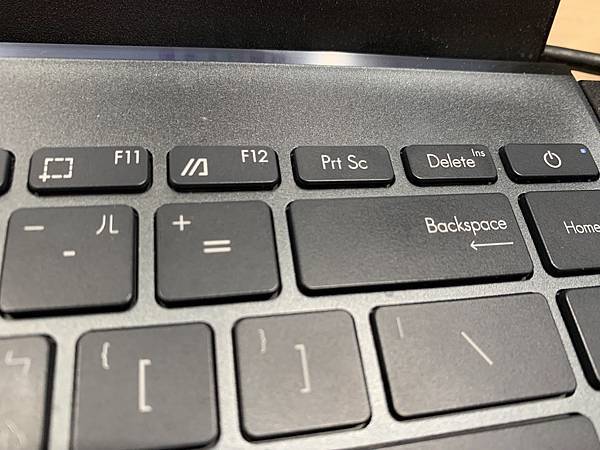
華碩ASUS 筆記型電腦的insert 鍵在哪邊!!??

因為習慣的關係,常會用到insert key
但是剛拿到華碩的notebook 時,一時不知道該如何是好,insert 鍵到底在哪邊
原來是跟 del 同一個鍵,字超級小
要怎麼按 insert 鍵 : Fn + Shift + Delete
抱怨....好難用...設計華碩鍵盤的人在想什麼
- Nov 18 Fri 2022 15:03
-
docker 建立 apache web server 超快速
- Nov 18 Fri 2022 09:28
-
docker 架設 mysql server 超級快
- Nov 15 Tue 2022 09:53
-
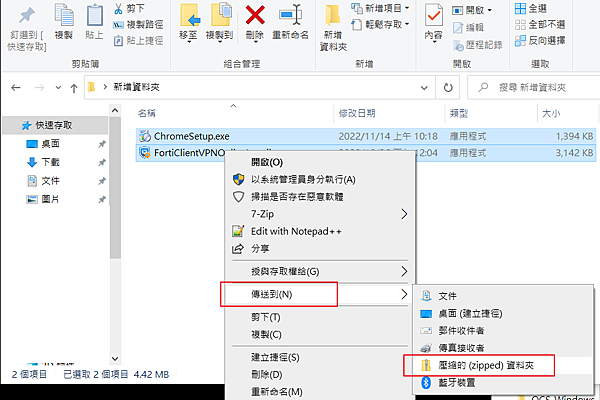
利用 windows 10 內建功能壓縮成 zip 檔

windows 內建的zip 解壓縮功能很方便也很直覺
如果沒有其他特殊需求,比如說要解 rar tar 7z 之類的檔案,其實真的可以不用再去下載其他的解壓縮工具
但壓縮成zip檔就沒那麼直覺了
以下是操作範例
- Nov 14 Mon 2022 15:14
-
解決 UNC 路徑不可當作 CMD 目前的目錄 問題
在批次檔內可以使用 %~dp0 指定工作路徑
但如果要指定網芳上的路徑,則會出現以下錯誤訊息
UNC 路徑不可當作 CMD 目前的目錄
解決方式,改用 pushd
如:
cd /d %~dp0
xxx.exe
yyy.exe
但如果要指定網芳上的路徑,則會出現以下錯誤訊息
UNC 路徑不可當作 CMD 目前的目錄
解決方式,改用 pushd
如:
cd /d %~dp0
xxx.exe
yyy.exe