跑perl程式如果有缺套件的安裝方式
到 http://search.cpan.org/ 搜尋缺的套件名稱
點進去後可以看到右上方有一個download的選項
下載壓縮檔到主機上
example
# wget http://search.cpan.org/CPAN/authors/id/G/GA/GAAS/Unicode-String-2.09.tar.gz
--2014-04-02 18:20:33-- http://search.cpan.org/CPAN/authors/id/G/GA/GAAS/Unicode-String-2.09.tar.gz
Resolving search.cpan.org (search.cpan.org)... 199.15.176.161
Connecting to search.cpan.org (search.cpan.org)|199.15.176.161|:80... connected.
HTTP request sent, awaiting response... 302 Found
Location: http://www.cpan.org/authors/id/G/GA/GAAS/Unicode-String-2.09.tar.gz [following]
--2014-04-02 18:20:34-- http://www.cpan.org/authors/id/G/GA/GAAS/Unicode-String-2.09.tar.gz
Resolving www.cpan.org (www.cpan.org)... 199.15.176.140, 2a01:608:2:4::2, 2620:101:d000:8::140:1
Connecting to www.cpan.org (www.cpan.org)|199.15.176.140|:80... connected.
HTTP request sent, awaiting response... 200 OK
Length: 122705 (120K) [application/x-gzip]
Saving to: `Unicode-String-2.09.tar.gz'
100%[==============================================================================================================================>] 122,705 116K/s in 1.0s
2014-04-02 18:20:35 (116 KB/s) - `Unicode-String-2.09.tar.gz' saved [122705/122705]
# tar -zxvf Unicode-String-2.09.tar.gz
cd Unicode-String-2.09
# perl Makefile.PL
Writing Makefile for Unicode::String
# make
Skip blib/lib/Unicode/String.pm (unchanged)
Skip blib/lib/Unicode/CharName.pm (unchanged)
cc -c -DAPPLLIB_EXP="/usr/local/lib/perl5/5.10.1/BSDPAN" -DHAS_FPSETMASK -DHAS_FLOATINGPOINT_H -fno-strict-aliasing -pipe -fstack-protector -O2 -pipe -fno-strict-aliasing -DVERSION=\"2.09\" -DXS_VERSION=\"2.09\" -DPIC -fPIC "-I/usr/local/lib/perl5/5.10.1/mach/CORE" String.c
Running Mkbootstrap for Unicode::String ()
chmod 644 String.bs
rm -f blib/arch/auto/Unicode/String/String.so
cc -shared -L/usr/local/lib -fstack-protector String.o -o blib/arch/auto/Unicode/String/String.so
chmod 755 blib/arch/auto/Unicode/String/String.so
cp String.bs blib/arch/auto/Unicode/String/String.bs
chmod 644 blib/arch/auto/Unicode/String/String.bs
Manifying blib/man3/Unicode::String.3
Manifying blib/man3/Unicode::CharName.3
# make install
Files found in blib/arch: installing files in blib/lib into architecture dependent library tree
FreeBSD: Registering installation in the package database
Cannot create directory /var/db/pkg/bsdpan-Unicode-String-2.09: File exists
Appending installation info to /usr/local/lib/perl5/5.10.1/mach/perllocal.pod
helloworld 發表在 痞客邦 留言(0) 人氣(64)
如果登入dovecot的pop3服務時出現這個錯誤訊息
Plaintext authentication disallowed on non-secure (SSL/TLS) connections
解決方式
編輯 /etc/dovecot/dovecot.conf
找以下兩個變數,如果沒有的話可以自己補上去
disable_plaintext_auth=no
ssl=yes
helloworld 發表在 痞客邦 留言(0) 人氣(1,057)
Microsoft Office Outlook 2010附件大小限制預設是20M
如果要附加超過20MB的附件就會出現"附件大小超過限制"的警告訊息
主要是外面的ISP不一定可以收那麼大的郵件,寄出去只是會造成對方的困擾
但如果一定要寄大檔的話可以修改windows的登入紀錄來解除這個限制
regedit
找到
HKEY_CURRENT_USER\Software\Microsoft\Office\14.0\Outlook\Preferences
新增
數值類型:DWORD
數值名稱:MaximumAttachmentSize
數值選10進位,如61440就是限制可以寄60MB的附件
helloworld 發表在 痞客邦 留言(0) 人氣(2,810)
Switch#sh int status
Port Name Status Vlan Duplex Speed Type
Gi0/24 notconnect 20 auto auto 10/100/1000Ba
Te0/1 err-disabled 10 full 10G unknown
Te0/2 err-disabled 20 full 10G unknown
下面的指令可以看到err-disabled的原因
Switch#show interfaces status err-disable
Port Name Status Reason Err-disabled Vlans
Te0/1 err-disabled gbic-invalid
Te0/2 err-disabled gbic-invalid
這個訊息是說不是用原廠gbic
helloworld 發表在 痞客邦 留言(0) 人氣(90)
vmkfstools -i /vmfs/volumes/datastore1/ms2/ms2.vmdk /vmfs/volumes/nfs_datastore/ms2/ms2.vmdk -d thin
vmkfstools -i /vmfs/volumes/nfs_datastore/ms2/ms2.vmdk /vmfs/volumes/datastore1/ms2/ms2.vmdk -d thin
helloworld 發表在 痞客邦 留言(0) 人氣(57)
修改設定檔
vi main.cf
smtpd_tls_mandatory_protocols = !SSLv2
smtpd_tls_protocols = !SSLv2
lmtp_tls_mandatory_protocols = !SSLv2
lmtp_tls_protocols = !SSLv2
重啟postfix
測試
openssl s_client -connect 127.0.0.1:25 -starttls smtp -ssl2
openssl s_client -connect 127.0.0.1:25 -starttls smtp -ssl3
openssl s_client -connect 127.0.0.1:25 -starttls smtp -tls1
helloworld 發表在 痞客邦 留言(0) 人氣(58)
修改apache設定檔
vi /usr/local/etc/apache22/extra/httpd-ssl.conf
SSLProtocol -ALL +SSLv3 +TLSv1
SSLCipherSuite ALL:!aNULL:!ADH:!eNULL:!LOW:!EXP:RC4+RSA:+HIGH:+MEDIUM
測試
openssl s_client -ssl2 -connect 127.0.0.1:443
CONNECTED(00000003)
19783:error:1407F0E5:SSL routines:SSL2_WRITE:ssl handshake failure:/usr/src/secure/lib/libssl/../../../crypto/openssl/ssl/s2_pkt.c:428:
openssl s_client -tls1 -connect 127.0.0.1:443
openssl s_client -ssl3 -connect 127.0.0.1:443
helloworld 發表在 痞客邦 留言(0) 人氣(596)
寄信到exchange回應
Oct 29 11:36:17 ms122 postfix/smtp[90653]: E8CD511871D4: to=<xxx@xxx.xxx>, relay=192.168.2.13[192.168.2.13]:25, delay=6.9, delays=0.1/0.02/1.8/5, dsn=5.7.1, status=bounced (host 192.168.2.13[192.168.2.13] said: 530 5.7.1 Client was not authenticated (in reply to MAIL FROM command))
因為exchange不接受匿名使用者的郵件
解決方法:
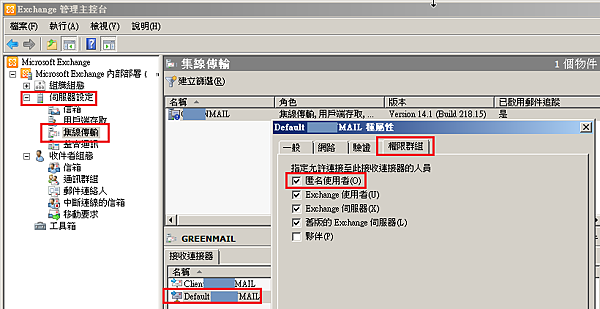
開啟EMC -> 伺服器設定 -> 集線傳輸 -> 選擇default 傳送連接器 -> 權限群組 -> 勾選匿名使用者 -> 確定
如果設定完仍然沒有生效建議重開機再測試
Exchange Server 2016工作現場實戰寶典:資安防護x高可用性x法遵管理x混合雲架構
作者: 顧武雄
出版社:碁峰
helloworld 發表在 痞客邦 留言(0) 人氣(810)
Oct 14 07:25:51 imail postfix/smtp[630]: A525###651C: to=<######@gmail.com>, relay=gmail-smtp-in.l.google.com[2607:f8b0:400e:c01::1a]:25, delay=5.7, delays=0.13/0.02/1.3/4.2, dsn=5.7.1, status=bounced (host gmail-smtp-in.l.google.com[2607:f8b0:400e:c01::1a] said: 550-5.7.1 [2001:4420:xxx:xxx::xxx 16] Our system has detected that this 550-5.7.1 message does not meet IPv6 sending guidelines regarding PTR records 550-5.7.1 and authentication. Please review 550-5.7.1 https://support.google.com/mail/?p=ipv6_authentication_error for more 550 5.7.1 information. a1si30721paf.121 - gsmtp (in reply to end of DATA command))
這是因為沒有設定ipv6的反解紀錄
記得,ipv6也是要設定PTR喔...
helloworld 發表在 痞客邦 留言(0) 人氣(863)
因為美國部分isp會擋tcp 25 port
所以從台灣帶notebook到美國出差的朋友往往就沒有辦法用原來的email寄信
解決方法
讓mail server可以listen tcp 587
幾個做法可以達成
1. 修改防火牆, 讓public ip 的tcp 25,587 都同時mapping到 tcp/25
2. 走vpn回來 (沒試過,理論上可以)
3. 如果是postfix,/usr/local/etc/postfix/master.cf
smtp inet n - n - - smtpd
submission inet n - n - - smtpd
並重新啟動postfix
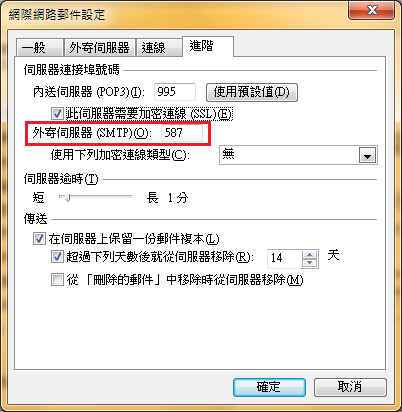
最後修改outlook設定,smtp從25 port改成587 port
helloworld 發表在 痞客邦 留言(0) 人氣(755)
